
A NATIVE MAC APP FOR AWS IAM IDENTITY CENTER
Your Mac, with an instance profile.
Sign in once and Quorra serves that role at the standard EC2 metadata address. The AWS CLI, the SDKs and Terraform pick it up through the ordinary provider chain — the same way they would on an instance.
DWG. 01 — CREDENTIAL PATH
Every hop between your tools and a temporary role, and what each one is allowed to touch.
AWS IAM Identity Center · device authorization, once per session
YOUR TOOLS
AWS CLI · SDKs · Terraform
unmodified provider chain
- GET /latest/meta-data/…
- no AWS_PROFILE, no endpoint override
MACOS
Network Extension
169.254.169.254:80 only
- forwards opaque TCP bytes
- never interprets, stores or logs them
QUORRA (SANDBOXED)
Local IMDSv2 server
127.0.0.1:7114
- mints IMDSv1 + IMDSv2 responses for the served profile
- binds 127.0.0.1 only · never reachable from your network
MACOS KEYCHAIN
Session token
+ role credentials
- read on demand, never copied into app files
What crosses which boundary
Quorra asks macOS for two approvals and one folder. Nothing else. If you would rather it never touched your AWS files, turn export off and it never writes to them.
| SURFACE | WHAT QUORRA USES IT FOR | SCOPE |
|---|---|---|
| Your AWS folder | Imports sessions and profiles once; writes them back only if you enable export. | one folder you pick |
| Network Extension | Forwards outbound TCP for the metadata address to Quorra's local backend. | 169.254.169.254:80 |
| macOS Keychain | Stores IAM Identity Center tokens and temporary role credentials. | never in app files |
| Local endpoints | Serve a chosen profile to tools that take a custom metadata URL. | 127.0.0.1 only |
| The app itself | Runs in the macOS sandbox for the whole of its life. | sandboxed |
Then it gets out of the way
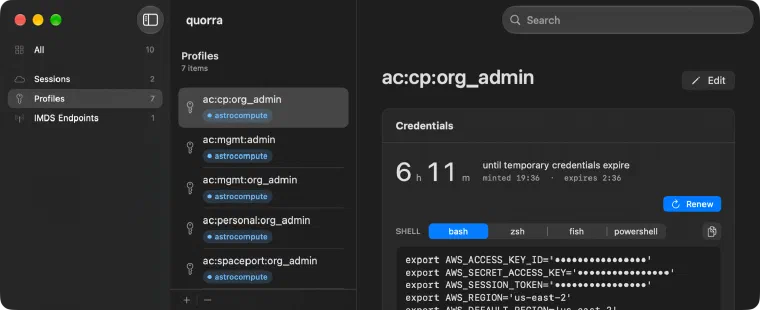
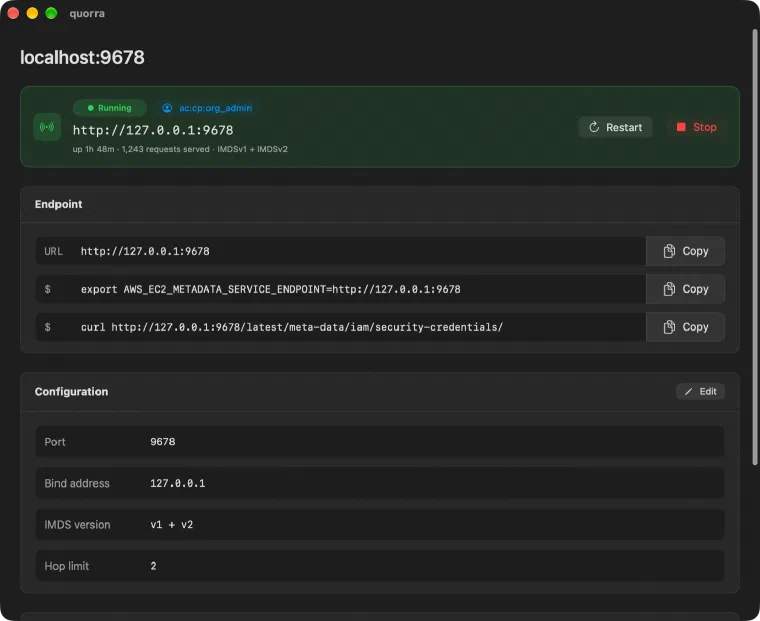
Sessions, profiles and endpoints in one three-column window. Sign in, watch the clock on every profile, copy the exact export snippet for your shell, and switch which profile the endpoint serves — from the window, the menu bar or the CLI.
SIGN IN
Native device authorization, the session refreshed for you, expiry always on screen.
COPY ENV
The exact snippet for bash, zsh, fish or PowerShell, shown before you copy it.
ENDPOINTS
Extra listeners on 127.0.0.1 with their own port, IMDS version and hop limit.
YOUR AWS FOLDER
Imported once, exported back on your say-so, other sections and comments kept.
Get Quorra 1.1.0
Download the disk image, move it to Applications, and point it at your AWS folder. macOS asks you to approve the system extension the first time you enable the default endpoint; after that it stays approved.